Disclaimer: The details of this post are shamelessly ripped from phatness.com. All credit to those guys, I just wanted a copy for myself for future reference.
On every OS ever, Home, End, Pg Up and Pg Down keys work like so:
- Home -> move the cursor to the beginning of the line
- End -> move the cursor to the end of the line
- Pg-Up -> move the cursor up the length of the viewport
- Pg-Dn -> move the cursor down the length of the viewport
But OSX in all its infinate wisdom decided that doesn’t make sense. Instead they should work like so:
- Home -> move (nothing, not even the cursor, just your view) to the beginning of the DOCUMENT
- End -> move (nothing, not even the cursor, just your view) to the end of the DOCUMENT
- Pg-Up -> move (nothing, not even the cursor, just your view) up the length of the viewport
- Pg-Dn -> move (nothing, not even the cursor, just your view) down the length of the viewport
Now I’m not one to criticise… but that’s stupid and anyone who likes it is stupid 😉
How to Fix
There’s a really useful open source utility out there called DoubleCommand which is highly recommended and I’m sure broadly used. If you want a non-application solution there are also some config files to edit to get the job done.
Most Applications
Create a file
/home/<username>/Library/KeyBindings/DefaultKeyBinding.dict and add the following:
{
    "\UF729"  = "moveToBeginningOfLine:";
    "$\UF729" = "moveToBeginningOfLineAndModifySelection:";
    "\UF72B"  = "moveToEndOfLine:";
    "$\UF72B" = "moveToEndOfLineAndModifySelection:";
    "\UF72C"  = "pageUp:";
    "\UF72D"  = "pageDown:";
}
Terminal
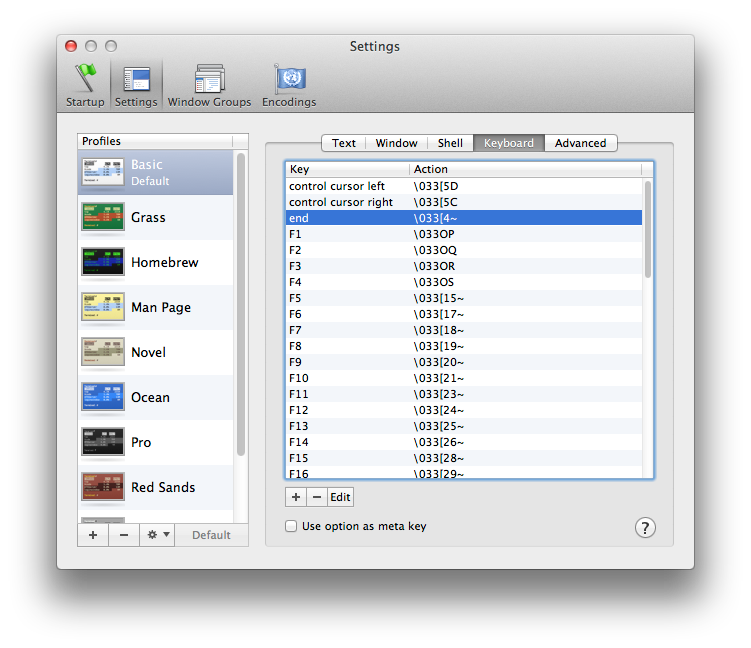
Terminal preferences
Open Terminal – Preferences – Settings – Keyboard. Edit each of the following setting their action to ‘send string to shell’.
Key		Escape Sequence

Home		\033[1~
End		\033[4~
Page Up		\033[5~
Page Down	\033[6~
Now open /home/<username>/.inputrc and add:
"\e[1~": beginning-of-line
"\e[4~": end-of-line
"\e[5~": history-search-backward
"\e[6~": history-search-forward
"\e[3~": delete-char
"\e[2~": quoted-insert
"\e[5C": forward-word
"\e[5D": backward-word
"\e\e[C": forward-word
"\e\e[D": backward-word
set completion-ignore-case On
Other notes
Restart your machine for changes to take affect. Restarting individual applications also works if you can’t restart for whatever reason. I hear Firefox needs its own changes – if you happen to know what those are comment below and I’ll add them in.